Safeguarding history: Our innovative solution
The "Unearthed" theme of this year's FLL Innovation Project challenged us to tackle a critical archaeological issue. We focused on the pervasive problem of looting, a threat to countless historical artifacts. Through dedicated research and collaboration with experts like the Archaeological Research Institute (ARI), we developed a solution designed not just for competition, but for real-world impact. This isn't just for FLL; it's for ARI and every archaeological company striving to protect our shared heritage.
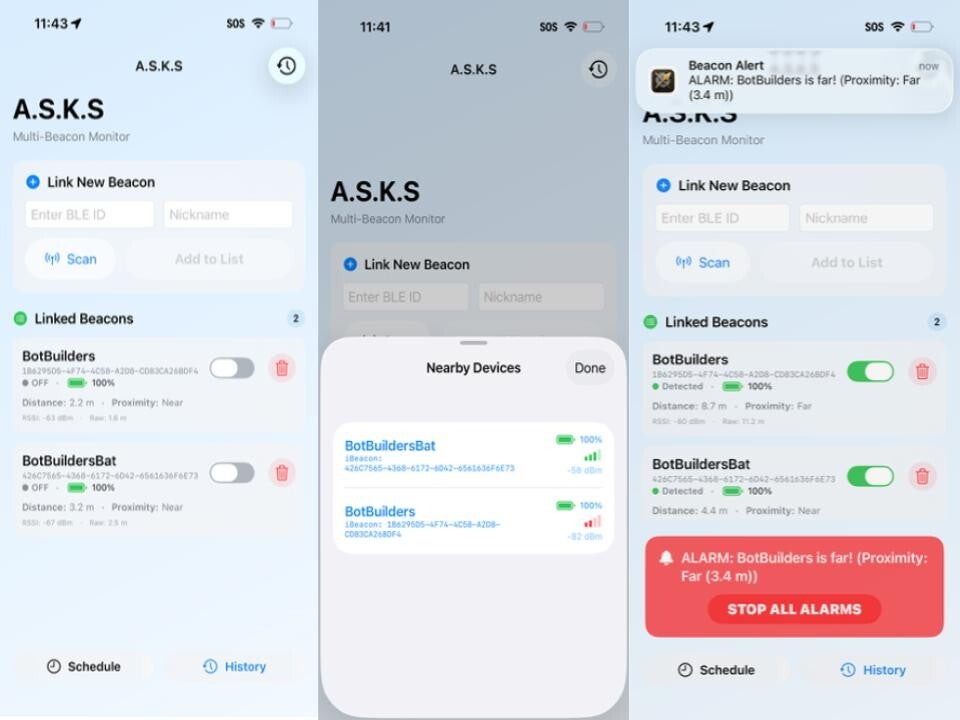
Introducing A.S.K.S.: Your artifact guardian
Our innovative answer to artifact security is the A.S.K.S. – the Artifact Safe Keeping System. This isn't just an idea; it's a practical mobile application that seamlessly connects to a Bluetooth Low Energy (BLE) module equipped with a motion sensor. Imagine archaeologists using specialized boxes for their finds; if any of these boxes are moved beyond a user-defined, customizable range, the connected phone immediately triggers an alarm, alerting them that their invaluable artifacts are at risk of being stolen.

Smart, secure, and accessible protection
What makes the Bot Builders' A.S.K.S. truly stand out? We designed it with the practical needs of archaeological companies in mind. It's incredibly easy to use, requiring minimal training, and critically, it's highly cost-effective – a vital consideration for organizations often operating with limited funding. Beyond that, A.S.K.S. functions perfectly without an internet connection and boasts an extended battery life, guaranteeing reliable protection even in the most remote excavation sites and during long expeditions. It's robust security, wherever history takes you.

A future free from looting
Our ultimate goal with the A.S.K.S. is to provide a straightforward, effective deterrent against artifact looting. We want visitors to this page to grasp the profound impact our solution can have. By leveraging accessible technology, we empower archaeologists to safeguard their invaluable discoveries, ensuring that historical narratives remain intact for future generations. Understand how our solution offers a tangible layer of defense against a persistent global problem.
App user guide - how to use it
-
Turn on your preferred BLE or BLEs
-
Click the scan button and add your BLE(S), or you can type in your BLE ID
-
Attach BLE inside the box that is being used.
-
Click to toggle each BLE so it’s on, which means that alarms and notifications WILL be activated. Or you can toggle it off, so alarms and notifications will NOT be activated.
-
You can also click the “Schedule” button on the app, to set a time for when you want the mode to change